The Ultimate Batch Processing Checklist for Softaken JSON Converter
-

- August 03rd, 2026
- 26 views

FREE SEO Topical Map Generator: Find Your Next Content Ideas
Overview
If you have to deal with hundreds of JSON files on a regular basis, converting files one by one can be tedious and error prone. If you are a developer, data analyst, business person or student, batch processing can make your life a lot easier.
This checklist will assist you to prepare, execute and verify large scale JSON file conversions with Softaken JSON Converter. It deals with pre-conversion preparation to post conversion verification. It assures efficient processing. It maintains data integrity.
What You Will Learn
- Preparing JSON files for batch conversion
- A step by step checklist to process multiple files
- Best Practice for Conversion Accuracy
- Batch processing: advantages and disadvantages
- Who can gain from this approach
What is batch processing?
Batch processing allows users to convert a set of JSON files at the same time, instead of doing it individually.
With the help of JSON Converter, users can convert 100+ JSON files at once, which saves manual effort and maintains the original folder structure and data integrity.
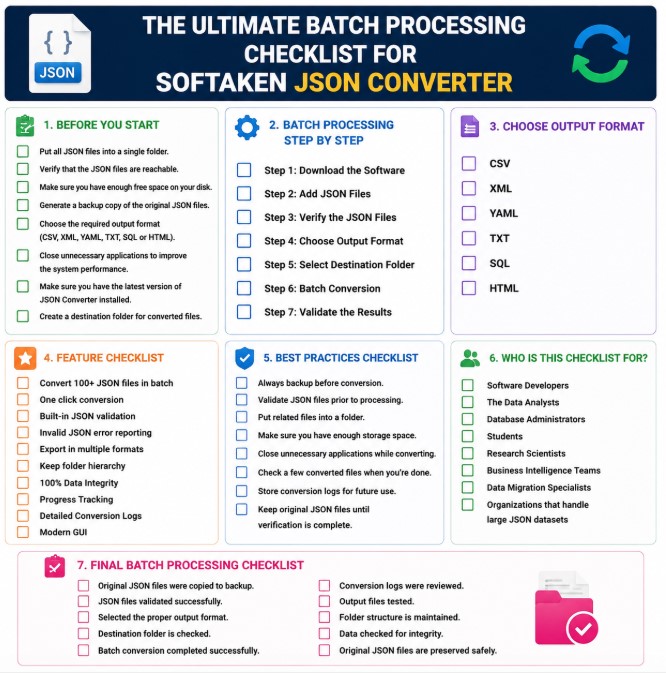
First What You Need To Do Before You Start
Before you begin the conversion, ensure the following requirements are met.
☐ Put all JSON files into a single folder.
☐ Verify that the JSON files are reachable.
☐ Make sure you have enough free space on your disk.
☐ Generate a backup copy of the original JSON files.
☐ Choose the required output format (CSV, XML, YAML, TXT, SQL or HTML).
☐ Close unnecessary applications to improve the system performance.
☐ Make sure you have the latest version of JSON Converter installed.
☐ Create a destination folder for converted files.
Checklist for Batch Processing Step by Step
Step 1: Download the Software
☐ JSON Converter Download
☐ Complete installation.
☐ Run the application.
Step 2: Add JSON Files
☐ Click on Add Files or Add Folder.
☐ Choose a folder that contains several JSON files.
☐ Verify that all files are loaded in the software.
Step 3: Verify the JSON Files
☐ Scan all files with the software.
☐ Review error reports on invalid JSON.
☐ Repair invalid files if needed.
☐ Proceed only if validated successfully.
Step 4: Choose Output Format
Choose the format you want:
☐ CSV
☐ XML
☐ YAML
☐ TXT
☐ SQL
☐ HTML
Step 5: Select Destination Folder
☐ Select a folder to save the converted files to.
☐ Offer sufficient storage space.
☐ Store the converted files separately from the originals.
Step 6: Batch Conversion
☐ Tap Convert.
☐ Check the progress bar.
☐ Wait for the conversion to finish.
Step 7: Validate the Results
☐ Verify that all files were converted.
☐ Randomly verify some of the output files.
☐ Check formatting is correct.
☐ Check data integrity.
☐ Maintain the original folder structure.
Feature Checklist
JSON Converter offers the following features:
☑ Convert 100+ JSON files in batch
☑ One click conversion
☑ Built-in JSON validation
☑ Invalid JSON error reporting
☑ Export in multiple formats
☑ Keep folder hierarchy
☑ 100% Data Integrity
☑ Progress Tracking
☑ Detailed Conversion Logs
☑ Modern GUI
Advantages of Batch Processing
✔ Saves a lot of time when processing in bulk.
✔ Eliminates unnecessary manual work.
✔ Has batch processing support.
✔ Keeps the original folder structure intact.
✔ Detects invalid JSON files prior to conversion.
✔ All data accuracy preserved.
✔ Supports Multiple Output Formats.
✔ Easy enough for beginners. Powerful enough for pros.
Drawbacks
Batch processing is very efficient, but there are a few things users should keep in mind:
· You need the Windows operating system.
· Invalid JSON files need to be fixed before successful conversion.
· Large batches may need additional free disk space.
· Initial scan time is a function of number and size of JSON files.
Best Practices Checklist
☐ Always backup before conversion.
☐ Validate JSON files prior to processing.
☐ Put related files into a folder.
☐ Make sure you have enough storage space.
☐ Close unnecessary applications while converting.
☐ Check a few converted files when you're done.
☐ Store conversion logs for future use.
☐ Keep original JSON files until verification is complete.
Who is this Checklist For?
This workflow is perfect for:
✔ Software Developers
✔ The Data Analysts
✔ Database Administrators
✔ Students
✔ Research Scientists
✔ Business Intelligence Teams
✔ Data Migration Specialists
✔ Organizations that handle large JSON datasets
FAQs
1. How many JSON files can be converted simultaneously?
The software can run batches of 100+ JSON files at once.
2. What output formats are supported?
You can convert JSON files to CSV, XML, YAML, TXT, SQL and HTML formats.
3. Does the software verify JSON files?
Yes. It has an inbuilt validation and reports invalid JSON files before conversion.
4. Is data integrity retained by the tool?
Yes. It is designed to revert to the original data without any modification.
Final Batch Processing Checklist
Before you finish, review the following:
☑ Original JSON files were copied to backup.
☑ JSON files validated successfully.
☑ Selected the proper output format.
☑ Destination folder is checked.
☑ Batch conversion completed successfully.
☑ Conversion logs were reviewed.
☑ Output files tested.
☑ Folder structure is maintained.
☑ Data checked for integrity.
☑ Original JSON files are preserved safely.
Conclusion
The most effective way to convert large collections of JSON files while maintaining accuracy and organization is batch processing. This checklist enables users to optimize conversions, reduce manual work and avoid processing errors. Softaken JSON Converter is useful tool for developers, analysts, students and companies who regularly work with JSON data. It supports 100+ file conversions at once, with built-in JSON validation, multiple export formats, progress tracking and total data integrity. This workflow helps to ensure data conversion is reliable, organized and efficient every time.