Cloud POS Software vs Traditional POS: Which Is Right for Your Store?
-
- July 20th, 2026
- 26 views

FREE SEO Topical Map Generator: Find Your Next Content Ideas
Introduction
If you've been researching billing software for your retail shop recently, you've almost certainly run into this question: should you go with cloud-based POS software or stick with a traditional desktop system? And if you've asked different people, you've probably received completely different answers, each delivered with equal conviction.
The cloud camp argues that cloud POS is the obvious choice — always updated, accessible from anywhere, no server maintenance, automatic backups. The traditional POS camp fires back that you can't risk billing stopping when the internet goes down, that your data is safer on your own machine, and that you don't want to pay forever for something you could own outright.
Here's the truth: both camps are partially right, and the correct answer depends almost entirely on how your specific shop operates, where it's located, how many outlets you have, and what you need the system to do.
This article gives you an honest, practical comparison — not a sales pitch for either model. By the end, you'll have a clear framework for deciding which type of POS system genuinely fits your store's situation, along with the real trade-offs you should factor into your decision.
Understanding the Two Models
Before comparing them, it helps to understand what each model actually means in technical terms — stripped of the marketing language.
What Is Cloud POS Software?
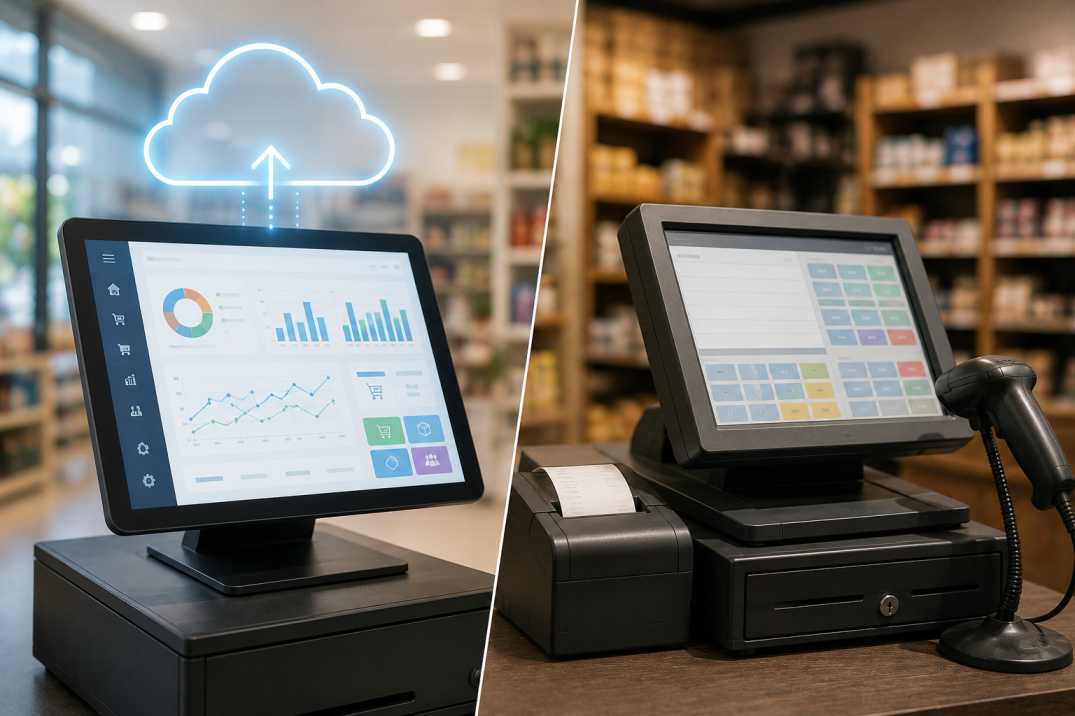
Cloud POS software runs on remote servers managed by the software provider. Your billing data, product catalog, inventory records, and reports are all stored online. You access the system through a browser or a dedicated app, and the software works as long as you have an internet connection. Updates, backups, and server maintenance are handled entirely by the provider.
Payment is typically on a subscription basis — monthly or annually — rather than as a one-time purchase.
What Is Traditional (Desktop / On-Premise) POS?
Traditional POS software is installed directly on a computer at your store. All data is stored locally — either on that machine or on a server within your premises. The software runs independently of the internet, meaning billing works regardless of your connectivity status. You own the software license (usually purchased once with optional annual maintenance), and you're responsible for your own backups, updates, and hardware.
Some modern traditional POS systems have added cloud sync features, creating a hybrid model — locally functional but with optional cloud backup or reporting access.
Head-to-Head Comparison: The 10 Dimensions That Matter
1. Internet Dependency and Billing Reliability
This is the single most important practical consideration for Indian retailers, and it deserves an honest answer.
Cloud POS: Requires a stable internet connection to function. If your connection drops during a busy billing hour, transactions stop until connectivity is restored. In urban areas with reliable broadband or 4G/5G, this risk is manageable. In Tier-2 cities, smaller towns, or areas with inconsistent connectivity, it's a genuine operational vulnerability.
Traditional POS: Works entirely offline. Billing, inventory updates, and reporting all function regardless of internet availability. For a shop in any location with unreliable connectivity, this is a significant practical advantage.
Verdict: Traditional POS has a clear edge for any retailer operating in areas where internet reliability is a concern. Cloud POS is viable where connectivity is consistently strong — but always verify whether your chosen cloud POS has an offline mode, as some do offer limited offline billing capability.
2. Data Backup and Security
Cloud POS: Backups happen automatically — typically in real time or at least daily — to the provider's servers. You don't have to think about it. If your billing computer is stolen, crashes, or catches fire, your data is safe and accessible from any other device immediately.
Traditional POS: Backup is your responsibility. If you don't configure a reliable automated backup schedule to an external drive or cloud storage, a hardware failure means potentially losing everything. Many small retailers discover this the hard way.
Data security works differently too. With cloud POS, your data lives on the provider's servers — which means your security is only as strong as their infrastructure and policies. With traditional POS, your data stays on your premises — which is more secure from external breach but more vulnerable to local physical risks (hardware theft, fire, flood).
Verdict: Cloud POS has a meaningful advantage in automatic backup reliability. Traditional POS can match this — but only if backup discipline is actually maintained, which many small retailers struggle to sustain consistently.
3. Upfront Cost and Ongoing Cost
Cloud POS: Lower upfront cost — no hardware server required, no large one-time software purchase. Monthly or annual subscription fees apply indefinitely. Over a three-to-five-year period, total expenditure is often higher than a traditional system, but spread across time rather than concentrated upfront.
Traditional POS: Higher upfront cost — software license plus hardware. Lower ongoing cost — typically just an annual maintenance contract at 15–20% of the license fee, which is optional. Over three to five years, the total cost is often lower than cloud if AMC is skipped or minimized.
Cost Comparison (Illustrative):
Cost Factor |
Cloud POS |
Traditional POS |
Initial software cost |
Low / Nil |
₹10,000 – ₹40,000 (license) |
Monthly fee |
₹500 – ₹3,000/month |
Nil (post-purchase) |
Annual cost Year 1 |
₹6,000 – ₹36,000 |
₹10,000 – ₹40,000 |
Annual cost Year 2+ |
Same subscription rate |
₹1,500 – ₹8,000 (AMC only) |
3-Year total estimate |
₹18,000 – ₹1,08,000 |
₹13,000 – ₹56,000 |
Server hardware needed |
No |
Sometimes (multi-user setups) |
Verdict: Traditional POS is typically more cost-effective over the medium to long term. Cloud POS is more accessible upfront — an important consideration for shops with limited initial capital.
4. Software Updates and GST Compliance
Cloud POS: Updates are deployed automatically by the provider. When GST rates change, e-invoicing thresholds are revised, or return formats are updated, your software reflects these changes without any action on your part. This is a meaningful advantage in India's evolving tax environment.
Traditional POS: Updates must be downloaded and installed manually, or require a service visit from the vendor. Shops on older perpetual licenses without active AMC may be running software that doesn't reflect current GST requirements — a compliance risk that's easy to overlook until it causes a filing problem.
Verdict: Cloud POS has a clear advantage for automatic compliance updates. This matters particularly in India where GST regulations have evolved regularly since implementation.
5. Remote Access and Multi-Device Flexibility
Cloud POS: Accessible from any device — desktop, laptop, tablet, or mobile — with a browser or app login. A shop owner can check real-time sales reports, current stock levels, and transaction summaries from anywhere, without being physically present at the billing counter.
Traditional POS: Accessible only from the computer(s) on which it's installed. Remote access to reports or data typically requires additional configuration or is simply not available. The owner must be at the store to see live data.
Verdict: Cloud POS wins decisively on remote access. For owners managing multiple locations or those who aren't always physically present, this is a significant operational advantage.
6. Multi-Store and Centralized Management
Cloud POS: Multi-store management is cloud POS's strongest use case. All locations connect to a central cloud database, meaning stock levels, sales data, pricing, and promotions are visible and manageable from a single dashboard across every outlet simultaneously.
Traditional POS: Multi-store management requires either a dedicated server infrastructure connecting outlets (technically complex and costly) or separate standalone systems per store (no centralization). Neither approach is as clean or cost-effective as cloud for multi-location retail.
Verdict: Cloud POS is substantially superior for any retailer operating more than one location.
7. Hardware Requirements and Setup
Cloud POS: Runs on existing hardware — any reasonably modern computer, tablet, or even a smartphone. No specialized server required. Setup time is minimal; you're typically operational within hours of subscription.
Traditional POS: Requires a dedicated computer for installation. Multi-user setups may require a local server. Setup is more involved — installation, configuration, and initial data entry. Hardware is a fixed commitment; if the machine fails, the software goes down with it until repairs or replacement.
Verdict: Cloud POS is simpler and faster to set up and more hardware-flexible. Traditional POS requires more deliberate hardware planning but offers the operational independence of not relying on any external service.
8. Customization and Industry-Specific Features
This dimension cuts differently depending on the software, not just the deployment model. Both cloud and traditional POS systems are available in industry-specific versions, and category fit matters more than deployment model when it comes to specialized features.
A retailer managing wiring, switchgear, fans, and lighting across hundreds of product codes needs software built for those operational patterns — which is exactly what a dedicated electrical shop billing software delivers, whether in cloud or desktop form. The category-specific features (serial number tracking, warranty management, contractor-specific pricing tiers) are what make it fit for purpose, not the deployment model.
Equally, a sporting goods retailer managing inventory across multiple sport categories, sizes, and brands — cricket, badminton, gym, swimming — benefits from the precise stock tracking and variant management that sports shop billing software is designed to provide. Whether that software is cloud-based or desktop-installed is secondary to whether it natively handles the operational complexity of a sports retail environment.
For a textile or garment retailer managing collections by size, color, and fabric, the variant-level inventory precision of textile billing software is what determines whether the software actually helps run the business or creates workarounds. The deployment model should support the way the shop operates — not define which features are available.
Verdict: Evaluate industry-specific fit first. Then choose between cloud and traditional deployment based on the operational and cost factors most relevant to your business.
9. Data Ownership and Portability
Cloud POS: Your data is stored on the provider's servers. In most cases you can export it, but your access depends on your subscription remaining active. If you stop paying or the provider shuts down, data recovery can become complicated. Always confirm data export rights and portability guarantees before committing to a cloud POS vendor.
Traditional POS: Data lives on your machine and is entirely within your control. Switching software providers is more straightforward because you can extract and import your data at any time.
Verdict: Traditional POS gives clearer, unconditional data ownership. Cloud POS users should explicitly verify export rights and what happens to their data if they cancel — this is a contractual matter worth clarifying upfront.
10. Support and Vendor Dependency
Cloud POS: Support is typically part of the subscription. Updates, bug fixes, and compliance patches are the vendor's responsibility. The trade-off is that you're entirely dependent on the vendor's uptime, their pricing decisions, and their continued operation as a business.
Traditional POS: Once purchased, the core software function is independent of the vendor. If they close or raise prices dramatically, your installed software continues to work. Support and updates are available through AMC but not essential for day-to-day operation.
Verdict: Traditional POS gives more operational independence. Cloud POS provides better ongoing support as part of the subscription model.
Complete Comparison Summary
Factor |
Cloud POS |
Traditional POS |
Internet dependency |
High (billing stops without internet) |
None (fully offline capable) |
Automatic backup |
✅ Yes, automatic |
❌ Requires manual setup |
Upfront cost |
Low |
Medium to High |
Long-term cost |
Higher (ongoing subscription) |
Lower (AMC only) |
GST compliance updates |
✅ Automatic |
Manual (requires AMC) |
Remote access |
✅ From any device, anywhere |
❌ On-site only |
Multi-store management |
✅ Excellent |
❌ Complex and costly |
Setup speed |
Fast (hours) |
Moderate (days) |
Data ownership |
Shared with vendor |
Fully yours |
Offline billing reliability |
Variable (check for offline mode) |
✅ Complete |
Vendor dependency |
Higher |
Lower |
Which Type of Retailer Should Choose Which?
Choose Cloud POS If:
You operate in a location with consistently reliable broadband or 4G/5G connectivity
You run or plan to run more than one outlet
You want real-time access to sales data and reports from outside the store
You prefer a lower upfront cost and predictable monthly expenditure
You want GST and compliance updates to happen automatically without any action on your part
You don't want to manage your own backups and IT infrastructure
Choose Traditional POS If:
Internet reliability in your area is inconsistent or unreliable
You operate a single store with no immediate plans to add outlets
You prefer to own your software outright and avoid ongoing subscription fees
Complete data control and vendor independence are priorities for you
You have an existing hardware setup you're comfortable maintaining
You want the assurance that billing will function no matter what happens to your internet connection
Consider a Hybrid System If:
You want the operational reliability of offline billing with the convenience of cloud reporting and backup
You operate in a mixed-connectivity environment where some locations have strong internet and others don't
You want a system that works fully offline but syncs data to the cloud when connected, giving you remote visibility without operational dependency
Legal and Business Compliance Considerations
The choice between cloud and traditional POS also has compliance implications worth factoring in.
For GST compliance in India, the most important question is whether your POS system — regardless of deployment model — stays current with GST requirements. Cloud POS systems handle this through automatic updates. Traditional POS users need to ensure their AMC is active and their vendor is prompt with compliance patches, particularly as e-invoicing thresholds continue to expand.
For data security compliance, businesses handling customer personal data have obligations under India's evolving data protection framework. Understanding where your data is stored and how it's protected — whether on your own hardware or a cloud provider's servers — is part of responsible compliance.
For business formalization, both deployment models can generate the organized billing records that support loan applications, MSME registration, GST audits, and institutional client requirements. The critical factor is that the system is configured correctly, used consistently, and generates accurate, retrievable records — which applies to cloud and traditional systems equally.
Globally, the same compliance logic holds: the deployment model is less important than the accuracy of the records the system generates and the reliability with which it maintains them.
Conclusion
There is no universally correct answer to the cloud vs traditional POS debate — and anyone who tells you otherwise is either simplifying the decision or has a product to sell. The right choice is the one that fits how your specific store operates.
If reliable internet, remote access, and multi-store management are your priorities, cloud POS is a natural fit. If offline reliability, data ownership, and lower long-term cost matter more to you, traditional POS is the more logical choice. And if you want the benefits of both without compromising on either, a well-designed hybrid system gives you that flexibility.
What matters most — regardless of which deployment model you choose — is selecting software that genuinely fits your retail category, configuring it correctly from the start, and using its full capabilities rather than treating it as a simple invoice printer.
Make the deployment decision last, after you've identified which software handles your shop's specific billing, inventory, and compliance needs. Get the features right first. Then choose the architecture that best supports how your business actually runs.
Frequently Asked Questions
1. Can cloud POS billing software work without internet in India?
Some cloud POS systems offer a limited offline mode that allows basic billing to continue during internet outages, syncing transactions to the cloud once connectivity is restored. However, not all cloud POS products offer this, and those that do may restrict certain features in offline mode. If internet reliability is a concern for your location, specifically ask vendors whether offline billing is supported and what functions remain available without connectivity before purchasing.
2. Is my business data safe with cloud POS software?
Reputable cloud POS providers encrypt data in transit and at rest, use secure data centers, and maintain regular backups. In many ways, professionally managed cloud infrastructure is more secure than a local billing computer with no dedicated IT support. That said, you should verify your vendor's data security certifications, understand where your data is stored geographically, and confirm what access rights they have to your business data as part of your due diligence.
3. What happens to my billing software if I stop paying a cloud POS subscription?
This varies by vendor, but most cloud POS providers will suspend access to the software and potentially restrict data export if subscription payments lapse. Before committing to any cloud POS, confirm the vendor's data export policy — specifically, whether you can download a complete copy of your transaction history, customer data, and product catalog at any time, and what happens to that data if you cancel or if the vendor ceases operations.
4. Can I switch from traditional POS to cloud POS without losing my existing data?
In most cases, yes — though the ease of migration depends on both your current software's export capability and your new cloud POS's import tools. Most modern systems can import product catalogs and customer data from Excel or CSV files. Historical transaction data migration is more variable; some vendors support it, others don't. Plan your migration carefully and confirm data portability with both your outgoing and incoming software vendor before committing.
5. Which is better for a retailer with two or three store locations — cloud or traditional POS?
Cloud POS is significantly better suited to multi-location retail. Centralized inventory visibility, consolidated reporting across outlets, and the ability to manage pricing and promotions from a single dashboard are all cloud POS strengths that are difficult and expensive to replicate with traditional on-premise systems. If you're managing more than one location, cloud POS should be your starting point.
6. Is there a meaningful cost difference between cloud and traditional POS over three to five years?
Yes, and it typically favors traditional POS over longer timeframes. Cloud subscription costs accumulate continuously, while a one-time license with annual AMC has a lower cumulative cost over three to five years in most scenarios. However, cloud POS often includes support, compliance updates, and infrastructure costs that a traditional POS user bears separately — so the comparison should account for total cost of ownership, not just the software fee alone.