Microsoft Dynamics 365 Treasury Management: The Complete AI-Powered Guide for CFOs (2026)
-

- July 20th, 2026
- 126 views

FREE SEO Topical Map Generator: Find Your Next Content Ideas
Ask a CFO what keeps them up at night, and “cash” is still near the top of the list, even at companies that are profitable on paper. Knowing exactly how much cash you have, where it sits, what’s coming in, what’s going out, and how exposed you are to currency or counterparty risk — that’s the real job of treasury, and for a long time, most finance teams have handled it through banking portals, Excel, and a lot of manual checking.
Microsoft Dynamics 365 has closed that gap significantly. What used to be a basic cash and bank module has become a genuine treasury capability, and the addition of AI agents and Copilot inside Dynamics 365 Finance has changed what treasury management can look like for mid-market and enterprise finance teams in 2026.
What Is Treasury Management?
Treasury management covers a company’s liquidity, cash, and financial risk: cash positioning across accounts and currencies, cash flow forecasting, liquidity management, payment control, bank relationship management, and financial risk oversight. At smaller companies, this is one person with a spreadsheet. At larger organizations, it’s a dedicated team working closely with FP&A and accounting.
What Dynamics 365 Treasury Management Actually Does
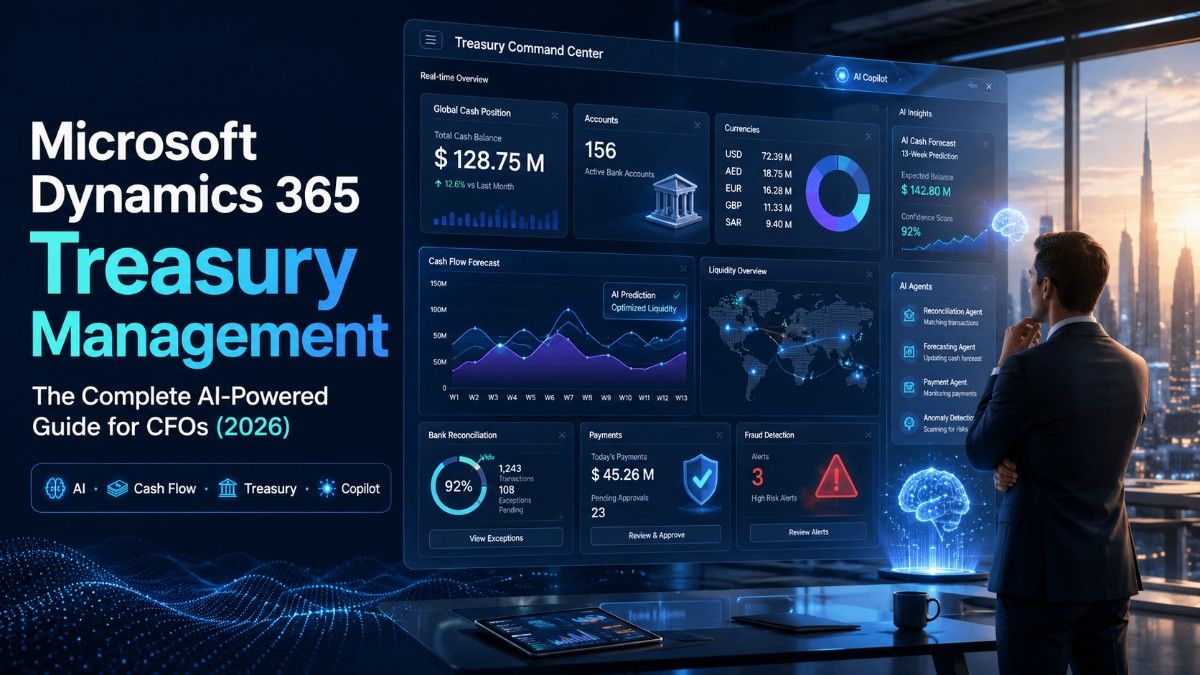
Treasury capability lives inside Dynamics 365 Finance, built on the cash and bank management module and extended through Copilot and Power Platform. Core features include:
- Centralized bank account management across entities and currencies
- Electronic bank statement processing (camt.053, BAI2, MT940)
- Automated bank reconciliation
- Payment processing with positive pay fraud controls
- Cash flow forecasting built from live AP, AR, and general ledger data
- Multi-currency, multi-entity consolidated reporting
- Power BI dashboards for real-time visibility
For companies that don’t need the depth of a dedicated treasury management system, this native setup is often enough, and it avoids running a separate platform alongside the ERP.
Where AI Actually Helps
AI in treasury today is strongest at three things: matching and pattern recognition, first-draft forecasting, and anomaly flagging. Reconciliation agents pre-match bank statement lines to ledger entries and route only exceptions to a human. Forecasting agents build a baseline cash forecast from historical AP/AR patterns for an analyst to review. Payment agents flag transactions that deviate from normal vendor patterns before release.
The honest framing for a CFO: this removes grunt work around matching and first drafts. It does not replace treasury judgment on liquidity strategy, risk, or exceptions — and any vendor claiming otherwise is overselling.
Cash Flow Forecasting and Liquidity
Because AP, AR, payroll, and the general ledger already live in one system, forecasts can be built from actual open transactions rather than spreadsheets assembled from separate exports. A solid setup layers known commitments, historical seasonality, and manual treasury adjustments into a rolling 13-week and medium-term forecast.
Liquidity management adds cash pooling, intercompany funding, and multi-currency positioning — giving treasury a consolidated view of where cash sits and the tools to move it where it’s needed. For multinational companies, this is often the biggest single justification for investing in proper treasury technology.
Payments, Reconciliation, and Fraud Controls
Payment automation covers structured payment runs and, critically, controls over who can initiate, approve, and release payments. Positive pay integration validates outgoing payments against what the bank expects, catching fraud before funds move.
Bank reconciliation is the most mature AI use case in Dynamics 365 today: statements import automatically, and matching logic pairs lines against ledger transactions, leaving only real exceptions for a human to review. For teams still reconciling manually, this is usually the fastest, most measurable win.
Dynamics 365 vs. SAP, Oracle, and Kyriba
Kyriba will out-feature any ERP-native module on pure treasury depth — it’s purpose-built for that one job, and remains the stronger choice for companies with active hedging programs or complex debt and investment portfolios. SAP and Oracle treasury modules are strong for organizations already committed to those ecosystems. Dynamics 365’s case is strongest for companies that want treasury and finance in one system without taking on a separate implementation — which describes a large share of the mid-market.
Best Practices and Common Mistakes
Get accurate, consolidated cash visibility working before layering on AI-assisted forecasting. Keep humans in the approval loop for payments and AI-drafted forecasts, at least through the first several cycles. Standardize bank statement formats early, and define segregation of duties before go-live rather than after an audit finding.
The most common mistake is treating a treasury rollout as an IT project instead of a finance-led initiative — and underestimating how much institutional knowledge the treasury team holds that never makes it into a requirements document.
Why Dynamic Netsoft Technology
Implementing treasury capability inside Dynamics 365 well depends less on the software and more on the partner’s understanding of finance operations. Dynamic Netsoft Technology works with enterprise and mid-market clients across the UAE, the wider Middle East, and Africa on Dynamics 365 Finance implementations — including cash and treasury configuration, bank connectivity, and Copilot-assisted forecasting rollouts built around real multi-entity, multi-currency operations rather than generic ERP templates.
Conclusion
Treasury management inside Dynamics 365 has moved well past basic cash and bank functionality. For most mid-market and enterprise teams, native cash management combined with Copilot-assisted reconciliation and forecasting now covers the majority of day-to-day treasury needs. The right choice depends less on which platform has the longer feature list and more on being honest about your organization’s actual complexity — and choosing an implementation partner who understands both the software and the treasury function itself.
FAQs
1. What is Dynamics 365 Treasury Management?
It’s the cash, bank, and liquidity management capability built into Dynamics 365 Finance, covering bank reconciliation, cash flow forecasting, payment processing, and multi-entity cash visibility.
2. Does Dynamics 365 replace a dedicated treasury management system (TMS)?
For many mid-market companies, yes. For organizations with complex hedging, debt, or investment portfolio needs, it’s usually paired with or complemented by a specialist TMS like Kyriba.
3. How does AI improve treasury management in Dynamics 365?
AI agents assist with bank reconciliation matching, draft cash flow forecasts from historical data, and flag payment anomalies, reducing manual effort on repetitive tasks.
4. Can Dynamics 365 handle multi-currency cash management?
Yes, it supports multi-currency and multi-entity cash positioning with consolidated reporting into a base currency.
5. How does Dynamics 365 compare to SAP Treasury?
SAP Treasury within S/4HANA offers strong depth for large global enterprises already on SAP. Dynamics 365 is often faster to implement and better suited to mid-market organizations, especially those already using Dynamics 365 Finance for core ERP.
6. What is cash pooling in Dynamics 365?
Cash pooling is the practice of consolidating cash balances across multiple bank accounts or entities, either physically or notionally, to optimize liquidity. Dynamics 365 supports structuring and tracking these arrangements.
7. How accurate is AI-generated cash flow forecasting?
It depends heavily on data quality and the maturity of the configuration. AI-drafted forecasts are best treated as a strong starting point that treasury reviews and adjusts, not a final output.
8. Does Dynamics 365 support fraud detection for payments?
Yes, through segregation of duties controls, positive pay integration, and anomaly flagging on payment patterns that deviate from historical norms.
9. How long does a Dynamics 365 treasury implementation take?
This varies widely based on scope — a basic cash management and reconciliation setup can take a few months, while a full multi-entity treasury rollout with AI forecasting can take longer. A partner like Dynamic Netsoft Technology can scope this based on your specific environment.
10. Why choose Dynamic Netsoft Technology for a Dynamics 365 treasury implementation?
Dynamic Netsoft Technology brings direct implementation experience across the UAE, Middle East, and Africa, with a specific understanding of multi-entity, multi-currency treasury requirements common in those markets.