How to Install & Run vCard Split Merge Tool on Windows 11
-

- July 06th, 2026
- 37 views

FREE SEO Topical Map Generator: Find Your Next Content Ideas
Introduction
If you have hundreds or thousands of contacts saved in a file, or if you want to merge multiple VCF files into one, it can become difficult to manage vCard (VCF) files. Many users export contacts from Android phones, iPhones, Outlook, Gmail, Thunderbird, and other email applications. These exported files are useful for backup and migration but can also be problematic when it comes to managing contacts. Users might want to import only selected contacts, combine several contact files, or split a large VCF file into individual contacts. These tasks are manual and time-consuming, which increases the likelihood of formatting problems or data loss. ViceVersa vCard Split Merge Tool is a professional Windows application to make contact management easy. The software enables users to split a large VCF file into separate contact files or merge multiple VCF files into a single file without altering the original contact data. It supports multiple vCard versions and preserves names, phone numbers, email addresses, company info, profile pictures, notes, addresses, and other contact properties. The software installs easily on Windows 11 and is usable by both technical and non-technical users.
Users Need the vCard Split Merge Tool: Reasons
With ever-growing contact databases, manual management of VCF files is increasingly difficult. There are often problems for users importing, organizing, sharing or merging contacts. Here are some of the common issues of the VvCard Split Merge Tool and their solutions.
Problem 1. Why is a large VCF file difficult to work with?
Big VCF files with hundreds or thousands of contacts are difficult to organize and maintain. Users often want only a few contacts, but are forced to work with the entire file. Looking for particular contacts, making backups or sharing single contacts can be a pain.
Why does it happen?
In most cases, devices and email applications export all contacts to one VCF file. All contacts are stored together, so it’s difficult to separate individual entries.
How do you fix it?
The vCard Split Merge Tool is designed to split a large VCF file into separate contact files. This makes it easier to manage, import, and share contacts.
Problem 2: Why is it hard to merge several VCF files?
Many users get separate VCF files from different devices, employees, or clients. Manually merging all of these files is very time consuming and often results in duplicate contacts or missing information.
Why does it happen?
Manual copy and paste doesn't keep the right structure of a vCard. A tiny mistake while editing can corrupt the contact file or delete important information.
How do you fix it?
The software automatically merges multiple VCF files into one file, maintaining full contact details and original formatting.
Problem 3: Why did I lose the contact information after editing it manually?
Some users are trying to use text editors to split or merge contacts of a VCF file. Unfortunately, even a small formatting error can make the whole VCF file unreadable.
Why does it happen?
VCF files are structured. Manually editing the file can inadvertently delete required fields, corrupt the file structure or corrupt contact information.
How do you fix it?
The vCard Split Merge Tool works automatically with VCF files without changing names, phone numbers, email addresses, profile pictures, notes, addresses, and all other contact properties.
Problem 4: Windows 11 won’t let me import my contacts properly.
Some users report that when they move VCF files between devices or applications, their contacts don’t get imported properly. Large files and incorrect formatting typically cause these incompatibilities.
Why does it happen?
Contacts may not import properly into Windows 11, Outlook, or other applications due to unsupported formatting, corrupted VCF files, or manual edits.
How do you fix it?
Once the vCard Split Merge Tool is installed and launched, users will be able to create valid VCF files that are compatible with Windows 11, Outlook, Android devices, iPhones, and other platforms that support them.
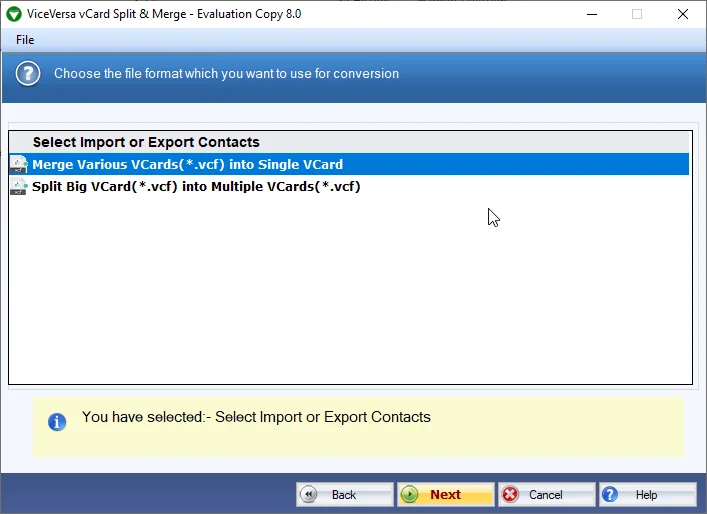
Download & Install vCard Split Merge Tool on Windows 11
Installing the software is easy and takes just a few minutes. Download the setup file from the official website, run the installer, and follow the on-screen instructions to complete the installation. Install the software, launch it, and choose either to split or merge VCF files. Add your VCF file or multiple VCF files, choose the destination folder, and click on the process button. The whole process takes a jiffy with the software while storing all the original contact information securely.
Advantages of vCard Split Merge Tool
The vCard Split Merge Tool offers many benefits for users who work with contact files. It splits large VCF files into individual contacts quickly and merges multiple VCF files without changing the original data. The software preserves names, phone numbers, email addresses, profile pictures, notes, company information, and addresses during processing. It supports multiple vCard versions, so it can work with contacts exported from various devices and applications. Its easy-to-use interface enables non-technical personnel and technical personnel to perform contact management tasks without any technical knowledge. The software correctly processes files, saving the user valuable time while maintaining full data integrity.
Why Use the vCard Split Merge Utility?
Manual methods to merge or split VCF files require technical expertise and valuable time. They also increase the chance of formatting errors and data loss. The vCard Split Merge Tool solves these problems by providing an automated and safe solution. If you want to merge VCF files from multiple sources or Split one big contact database into smaller files, the software does the job accurately with all the original contact information intact. It is a great choice for home users, businesses, and IT professionals looking for a reliable contact management solution.
Conclusion
The vCard Split Merge Tool is the perfect solution if you're looking for an easy way to install and use a reliable vCard Splitter on Windows 11. It also makes it easy to manage contacts by letting users split huge VCF files and merge multiple contact files without losing data or format. This software has a user-friendly interface, fast processing speed, and gives you accurate results, which helps you manage your contacts properly and saves your time and efforts.
Frequently Asked Questions
Q1. Can I split a VCF file that has thousands of contacts?
Yes. The software is capable of splitting both small and large VCF files into individual contact files efficiently.
Q2. Would it be possible to merge multiple VCF files?
Yes. It combines multiple VCF files into one, preserving all contact information.
Q3. Will the software save contact photos and other information?
Yes. It retains profile photos, phone numbers, email addresses, notes, addresses and all other contact properties.
Q4. Does this software work on Windows 11?
Yup. The software runs flawlessly on Windows 11 and other supported versions of the Windows operating system.
Q5. Do I need any technical skills to operate the software?
No. It is a simple interface that helps a beginner and a professional to manage VCF files with ease.