Salesforce Approval and Signature Workflow: Enhancing Business Efficiency Through Automation
-

- June 25th, 2026
- 2,089 views

FREE SEO Topical Map Generator: Find Your Next Content Ideas
Streamline Document Approvals and Electronic Signatures with Salesforce
In today's fast-paced business environment, organizations are constantly looking for ways to improve efficiency, reduce delays, and enhance customer experiences. One area that often creates bottlenecks is the approval and signature process. Traditional methods that rely on manual reviews, email exchanges, and paper-based signatures can slow down operations and increase the risk of errors.
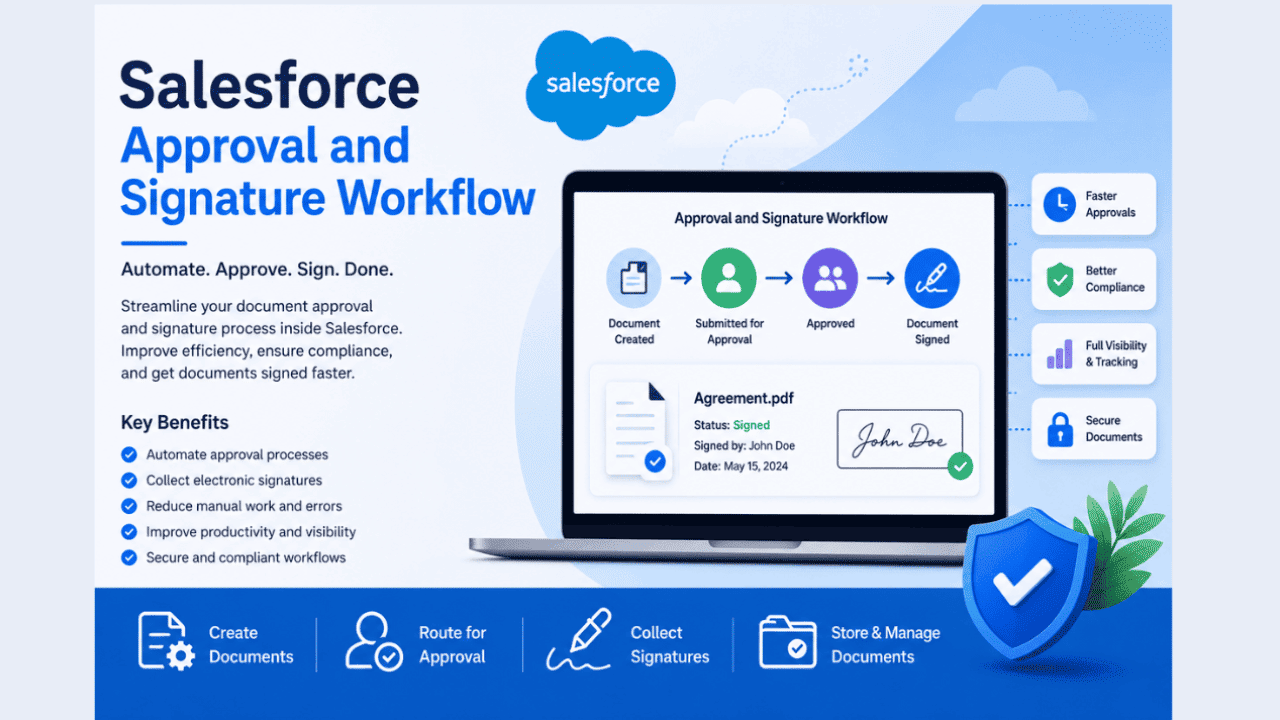
Salesforce Approval and Signature Workflow provides a modern solution by automating document approvals and electronic signatures within the Salesforce ecosystem. By integrating approval processes directly into business workflows, organizations can improve productivity, strengthen compliance, and accelerate decision-making.
Understanding Salesforce Approval and Signature Workflow
A Salesforce Approval and Signature Workflow is an automated process that manages document reviews, approvals, and signatures from start to finish. Instead of manually sending documents between departments or stakeholders, workflows automatically route documents to the appropriate individuals based on predefined business rules.
These workflows can be applied to various business documents, including contracts, proposals, service agreements, purchase orders, onboarding documents, and policy acknowledgments. Automation ensures that every document follows a consistent process while providing complete visibility into its status.
Why Businesses Need Approval Automation
Many organizations still depend on manual approval processes. While these methods may work for small teams, they often become inefficient as businesses grow.
Common challenges include:
- Delayed approvals due to missed emails
- Lack of visibility into document status
- Manual follow-ups and reminders
- Data entry errors
- Compliance and audit challenges
- Difficulty managing document versions
By implementing Salesforce Approval and Signature Workflow, businesses can overcome these obstacles and create a more efficient document management process.
Key Benefits of Salesforce Approval and Signature Workflow
Faster Approval Cycles
One of the biggest advantages of workflow automation is speed. Documents are automatically routed to the correct approvers based on predefined criteria. Stakeholders receive notifications instantly, reducing the waiting time associated with manual processes.
Faster approvals help sales teams close deals sooner, improve customer satisfaction, and increase overall operational efficiency.
Improved Accuracy
Manual document handling often leads to mistakes such as incorrect customer information, outdated pricing, or missing approval steps. Automated workflows use Salesforce data to populate documents accurately, reducing the likelihood of human error.
Consistent data and standardized templates help maintain professionalism and ensure document accuracy across the organization.
Enhanced Visibility and Tracking
Workflow automation provides real-time visibility into every stage of the approval process. Team members can easily see:
- Who reviewed the document
- Pending approvals
- Completed signatures
- Approval timelines
- Document history
This transparency improves collaboration and eliminates confusion regarding document status.
Better Compliance and Governance
Compliance is a critical concern for many organizations. Automated approval workflows create detailed audit trails that record every action taken on a document.
Businesses can demonstrate compliance by maintaining records of:
- Approval dates
- User actions
- Document versions
- Signature timestamps
This information is valuable during audits and regulatory reviews.
The Role of Electronic Signatures
Electronic signatures have become a standard component of modern business operations. They allow documents to be signed securely from any location, eliminating the need for printing, scanning, and physical storage.
When integrated with Salesforce workflows, electronic signatures help organizations:
- Reduce turnaround times
- Improve customer experiences
- Support remote work environments
- Minimize paper usage
- Increase document security
Customers and employees can sign documents quickly using computers, tablets, or mobile devices, making the entire process more convenient.
Integrating Approval Workflows with Document Management
Effective approval workflows often require strong document management practices. Organizations need a secure way to store, organize, and retrieve documents after approvals are completed.
Many businesses use specialized document management solutions alongside Salesforce to improve workflow efficiency. Platforms such as Dochly are frequently mentioned in discussions about document organization because they help teams centralize files and maintain better control over business documentation.
A centralized approach ensures that approved and signed documents remain accessible while supporting governance and retention policies.
Best Practices for Successful Workflow Implementation
Define Clear Approval Rules
Organizations should establish clear approval paths based on document type, value, department, or business requirements. Well-defined workflows reduce confusion and improve consistency.
Standardize Document Templates
Using approved templates ensures that documents contain accurate information and follow organizational standards.
Automate Notifications and Reminders
Automated reminders help prevent delays by notifying approvers when action is required. This reduces the need for manual follow-ups.
Maintain Accurate Salesforce Data
Workflow automation depends on reliable data. Keeping Salesforce records updated helps ensure that documents are generated correctly.
Monitor Performance Metrics
Tracking workflow performance allows businesses to identify bottlenecks and improve efficiency over time.
Useful metrics include:
- Average approval time
- Signature completion rates
- Document turnaround time
- Workflow completion percentages
Supporting Digital Transformation Initiatives
As organizations continue their digital transformation journeys, workflow automation has become an essential business capability. Automated approvals and signatures reduce administrative workloads while enabling teams to focus on strategic activities.
Industry discussions and technology resources, including content shared through UTECHHUB, often emphasize how workflow automation contributes to operational excellence and long-term business growth.
Businesses that invest in automation are better positioned to adapt to changing customer expectations and evolving workplace environments.
Future Trends in Approval and Signature Workflows
The future of workflow automation is expected to include greater use of artificial intelligence, predictive analytics, and intelligent document processing.
Emerging technologies may help organizations:
- Automatically identify approval requirements
- Detect document anomalies
- Predict approval delays
- Improve workflow recommendations
- Enhance compliance monitoring
Solutions such as Dochly are part of a broader movement toward smarter document management and workflow optimization, helping organizations prepare for future business demands.
Conclusion
Salesforce Approval and Signature Workflow enables organizations to automate document approvals, simplify signature collection, and improve overall efficiency. By replacing manual processes with structured workflows, businesses can reduce delays, improve accuracy, strengthen compliance, and enhance collaboration.
As digital business operations continue to evolve, approval and signature automation will remain an important tool for organizations seeking greater productivity and better document management. Implementing a well-designed workflow strategy can help companies streamline operations, improve customer experiences, and support sustainable growth in an increasingly competitive marketplace.